Why a keyword generator misses what your buyers check
· 3 min read
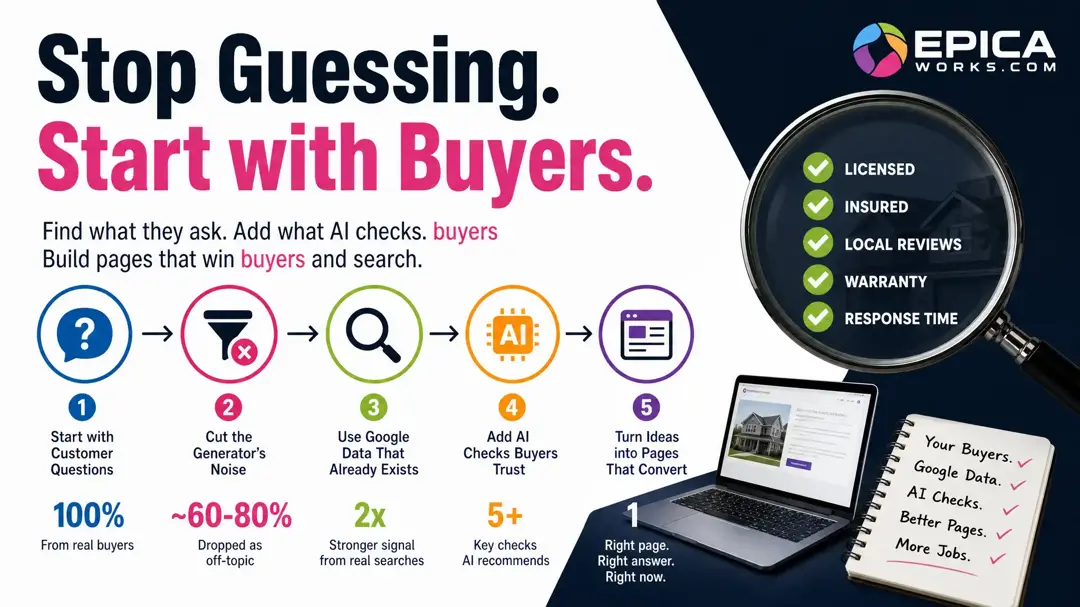
A keyword generator only lists what people already typed, so it misses the checks ChatGPT and Gemini tell buyers to make before they hire anyone. Start from the questions customers ask you, Google's “People also ask” and Search Console, then ask those AI engines what a buyer should check.
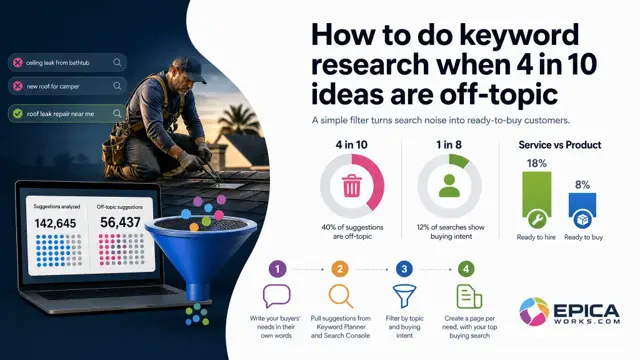
You typed your main service into a free keyword generator one evening and got hundreds of ideas back. Most look plausible, some are about other trades or other towns, and none tells you which to write first. The four steps below build a shorter list from your buyers, then use the generator's export only to check the words.
Start with the questions customers already ask you
Go through last month's calls, emails and quote requests and write down every question in the customer's words, not yours: “do you come out on weekends?”, “is it cheaper to repair or replace?”, “how long will the job take?”. These customer questions are the best keywords for website pages you will ever get, because a buyer asked each one before paying.
The question asked most often by phone deserves a page of its own. Answer it in the first lines, in the customer's words, and add what only you can give: your price range, the area you cover, photos of real jobs. Check it worked: if a question uses a word your website never uses (“leak” where your pages say “water intrusion”), that word is a keyword idea, and it goes into the page title.
Cut the generator's list before you write anything
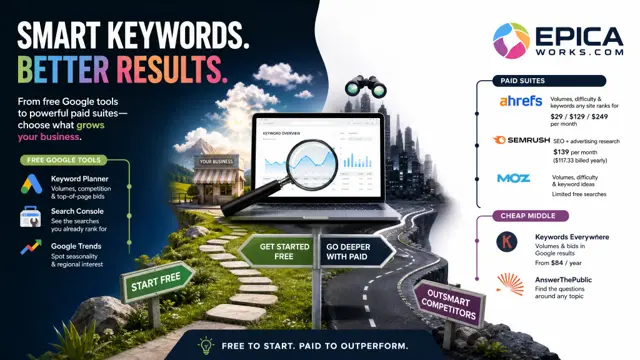
Google's own Keyword Planner says it includes “a keyword generator tool to find related keyword ideas”, and the paid tools work the same way: they return past searches that share your words, not your work. Expect off-topic rows: ideas that share a word with your service and nothing else, which no customer of yours would ever type.
So cut first. For each row, ask one question: would someone who types this hire me, for a job I do, in a place I work? Delete the rows that fail it:
- other towns or states you do not serve;
- other trades that share a word with yours;
- jobs you do not take on, or products you do not sell;
- job seekers (“roofer salary”, “plumber training”).
Check it worked: what is left should read like a mix of your price list and the questions from step one. If a row survives that you cannot picture a customer saying aloud, delete it too.
Read what Google already shows for your service
There are two free places to find Google keywords that come from real searchers rather than from your own words. The first is the People also ask box. Search your main service with your town, logged out, in a private window, and open the questions one by one; every one you open adds more below it. Copy the ones a customer of yours would ask.
The second is Search Console, if your site is connected. Open Performance, then Search results, and read the Queries tab, which Google's help on the Performance report describes as the searches people typed that showed your site. Filter for queries containing “how”, “cost” or “near” to find the questions you already appear for without a page that answers them.
Check it worked: a query that appears in Search Console and also matches a question from step one is your next page. You already show up for it; the page is what turns the appearance into a call.
What does ChatGPT tell your buyers to check?
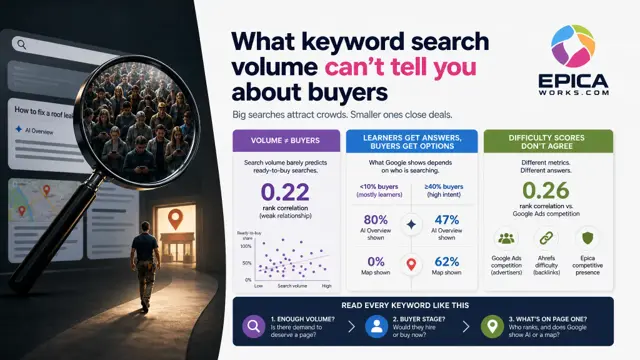
This is the part a generator cannot see. A buyer who asks ChatGPT how to choose someone like you gets an answer that lists what to check before hiring, and the buyer never typed those checks, so a tool built from typed searches has nothing to count.
Find them yourself. Logged out, ask ChatGPT and Gemini five real customer questions with your town in them, such as “what should I check before hiring a roofer in Tampa?” Ask both, because they cite different sites, and ask each question more than once: one answer is one draw, and the checks that come back every time are the ones that matter. Write down each one (a license, insurance, a local code, a warranty, a response time, whatever comes up for your trade) and the date.
These checks are not keywords to rank for on their own. They are the sections and promises your service pages need, so that a buyer, and the AI reading your page, find the answer there.
Turn each idea into a page, a section or nothing
You now have three kinds of idea, and each has one place:
- A question customers ask you by phone gets its own page, answered at the top.
- A check the AI answers keep raising gets a short section on the service page, with the fact that proves you meet it: your license number, your warranty in years, your call-out time.
- A generator row that survived the cut but no customer asks waits, or never gets written.
You do not need any of this if your calendar is already full from referrals and you are not trying to grow, or if your site has no page per service yet: one page per service with a clear title comes before any keyword list.
This week, run one of those AI questions three times in ChatGPT and three in Gemini, pick the check that came back most often, and add a short paragraph on it to your main service page with the fact that proves you meet it. Epica's industry cards list those checks for each trade they cover, with the month they were measured.