Questions
When paid keyword research tools are worth it for a small business
· 2 min read
Start with Google's free Keyword Planner and Search Console, and pay for Semrush or Ahrefs only on the day you need what they add: the keywords a competitor ranks for and a difficulty score. Even then, one month on a monthly plan usually covers the job.
The question tends to arrive with a trial offer: a dashboard full of charts and a price that starts at $129 or $139 a month. Before you enter a card, write down the one job you want the tool for this month. That sentence decides the tool, and for most owners of a local service it decides that the tool is free.
Decide by the job you have this month
Match the tool to the job, not the brand:
- If you are listing searches for your own services on a site of a few pages, use Keyword Planner and Search Console and pay nothing.
- If Keyword Planner shows you only ranges, add Keywords Everywhere, which puts volumes next to Google's results.
- If you need what a competitor ranks for, pay one month of Ahrefs Lite or Semrush's SEO plan, billed monthly, then cancel.
- If you want questions to answer on your pages, use AnswerThePublic and the questions Google shows on its own results page.
- If you want to know how hard a search is to win, a paid suite's difficulty score is the only place it lives; read it as an estimate, not a verdict.
A plumber choosing between two services to push this spring needs the first line, not the third. An owner whose rival keeps appearing above them for “water heater installation” is in the third.
What each tool measures and what it costs
Prices are the vendors' monthly list prices, checked on their pricing pages on November 2, 2026, except where the plan is yearly. Use the table to pick, then read the next two sections before paying.
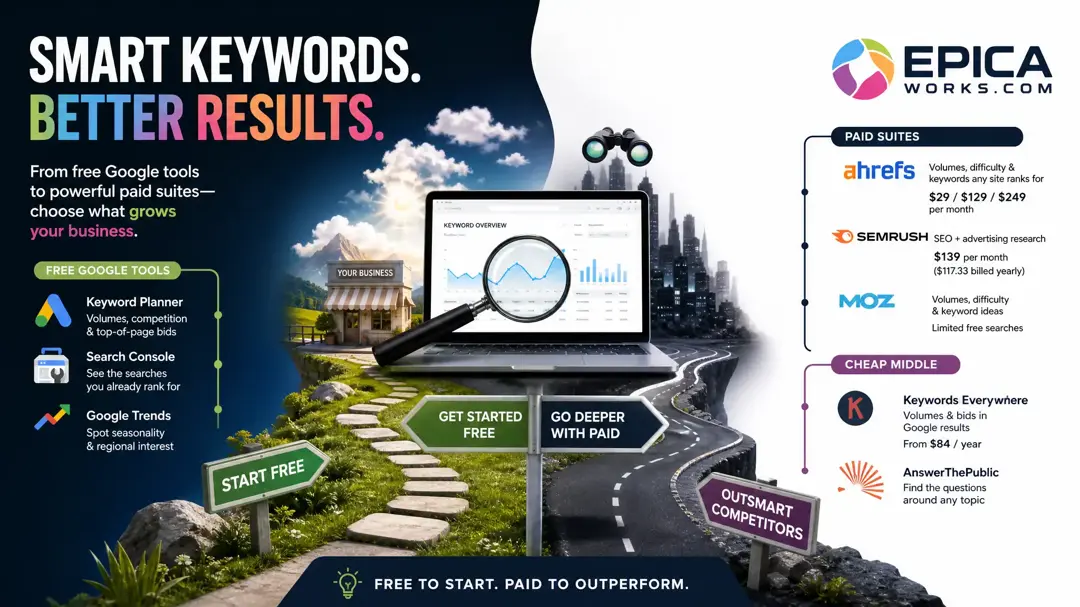
| Tool | What it measures | Cost |
|---|---|---|
| Google Keyword Planner | Volumes, ad competition, bids | Free, inside Google Ads |
| Google Search Console | Searches your site appears for | Free |
| Google Trends | Interest over time and by region | Free |
| Ahrefs | Volumes, difficulty, competitors' keywords | Starter $29, Lite $129, Standard $249 |
| Semrush | The same, plus ad research | SEO plan $139 ($117.33 yearly) |
| Moz Keyword Explorer | Volumes, difficulty, ideas | Limited free searches a month |
| Keywords Everywhere | Volumes next to Google's results | From $84 a year |
The free rows cover what most small businesses need. The paid rows are worth reading as a list of what you would be buying: difficulty and other people's keywords, nothing about your own site that Search Console does not already show.
Get everything the free tools give first
Google describes Keyword Planner as “a free keyword search tool to help advertisers build keyword lists for search campaigns”, and it opens from a Google Ads account; Google adds that “no separate account creation is necessary”. Accounts that spend little see volume ranges instead of exact figures: Google's own message, reported by Search Engine Journal, says “advertisers with lower monthly spend may see a limited data view”, so a search with 500 a month shows as 100 to 1K. A low budget costs you precision, not access, and for choosing between two services a range is usually enough.
Google Search Console is the best source on your own site. In the Performance report, the Queries tab lists the searches you already show up for, with clicks and average position. Sort it by impressions: a search with many impressions and few clicks is a page that exists but does not answer well, which is cheaper to fix than a new page. Google Trends shows relative interest rather than volumes, so use it to see which month your season starts.
Open both tools in your own name. If an agency sets them up for you, have it done in your Google account and add the agency as a user, so the history stays with you when the contract ends.
Pay for one month when a competitor is the question
A paid suite adds three things, and a small business rarely needs all of them. The first is competitor keywords: Ahrefs and Semrush show the searches any site ranks for, which Search Console shows only for a site you own. The second is the difficulty score. The third, in Semrush, is research on other advertisers' ads.
Before paying, try the free samples: the Ahrefs keyword generator is free, Semrush's free plan allows 10 reports a day, and Ahrefs has a free plan with data on your own site. If those answer the question, stop there.
If they do not, run the paid month as a short project. Write down the three competitors you want to look at before you start the trial. Export each one's ranking keywords, filtered to the services you sell. Save the exports to your own drive, then cancel before the renewal date and put that date in your calendar on day one. Check that it paid off: the month should end with a list of pages to write, each tied to a search a competitor wins and you do not.
Who can skip the paid suites entirely
Skip them if you serve one area with a handful of services, if your work comes mostly from referrals and repeat customers, or if your site has not yet spent three months in Search Console. In the last case there is nothing to compare against: set up Search Console now and come back when it has data.
Buying a year “to have it” is the other case to skip. A suite paid for a year and opened twice is money gone, and a volume read once means little without the date it was read and a second reading to compare it with.
Before you pay for anything this week, open Search Console's Queries report for the last three months and mark the five searches you already appear for that match a service you sell. If you want to see who gets recommended for those searches instead of you, the free analysis at Epica reads it from your site's address.