How a Google index checker shows why Google skips your site
· 5 min read
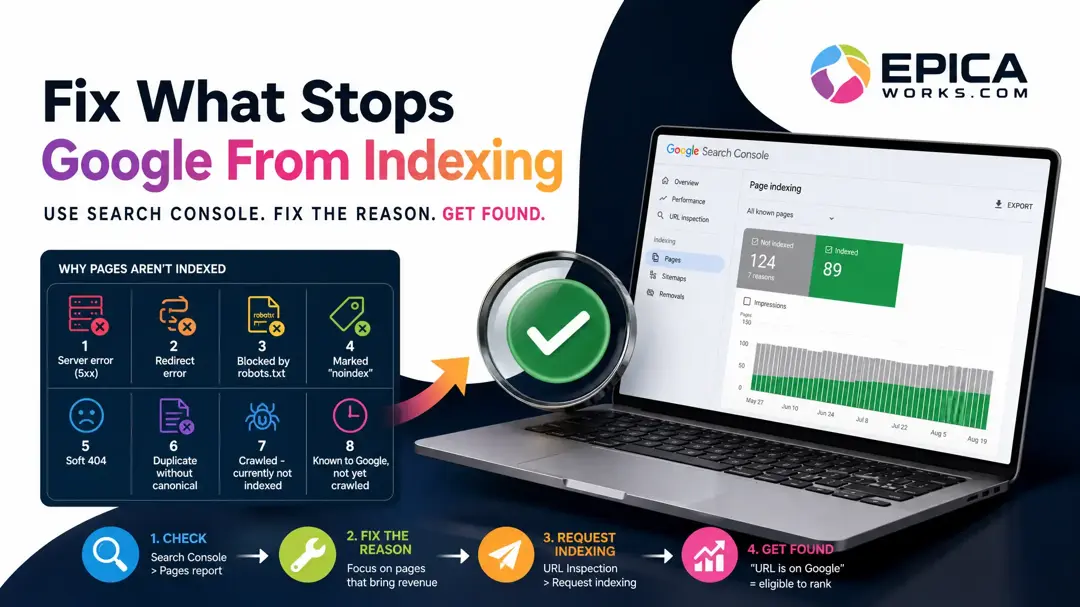
The Google index checker worth using is the free Pages report in Google Search Console, which lists each page Google left out of its index and the reason why. Fix that reason first: a page outside the index never shows up, whatever anyone searches.
You search for the service you sell, add your town, scroll, and your page is nowhere. Before you blame the design, the copy or the agency, answer a narrower question: does Google have that page at all? A site can look perfect in your browser and still be missing from Google, and until it is in, nothing else you change on it will bring a single visit.
Take a two-minute look with a site: search
Open Google and type site:yourwebsite.com, with your own domain and no space after the colon. Google returns the pages it holds for that domain. Then search site:yourwebsite.com/your-service-page for the pages that earn you money: the home page, each service page, the contact page.
Write down which of those are missing. Treat this as a rough look, not a count: it tells you something is wrong, never why. The why lives in Search Console, and the rest of this post works from there.
Open the Pages report in Search Console
Search Console is Google's free dashboard for site owners. Add your site as a property and verify it; the setup screens walk you through both. Do it in your own Google account, and if an agency or web designer runs the site, add them as users rather than letting them own it, so the history stays with you when the contract ends. If someone already set it up for you, ask them for owner access today.
Inside, open Indexing, then Pages. The chart splits your URLs into indexed and not indexed, and the table under it, “Why pages aren't indexed”, gives one row per reason with the pages it affects. A long not indexed list is not by itself bad news. Google says so plainly in its Page indexing report help: “Don't expect every URL on your site to be indexed.” Old tag pages, thank-you pages and duplicates belong there. Your service pages do not.
Read the reason before you fix anything
Click each reason, then the example URLs it lists. What matters is whether a page that should bring customers sits under it. These are the reasons a small business site meets most often, in Google's own labels:
| Reason in the report | What it means | What to do |
|---|---|---|
| Server error (5xx) | Your server failed when Google asked for the page | Send the URL to your host or web designer |
| Redirect error | A redirect loops or runs too long | Point the old address straight at the new one |
| URL blocked by robots.txt | Your robots.txt file tells Google to stay out | Remove the rule that covers the page |
| URL marked “noindex” | The page asks Google not to index it | Remove the tag, often a setting left on from launch |
| Soft 404 | The page loads but looks empty or missing to Google | Put the real content back, or return a true 404 |
| Duplicate without user-selected canonical | Google sees two versions and picked another | Fine if the twin is yours and indexed; otherwise mark the main one as canonical |
| Crawled - currently not indexed | Google read the page and chose not to keep it | Make the page worth keeping (see below) |
| Known to Google, not yet crawled (the second “currently not indexed” reason) | Google has the address but has not read the page yet | Link it from your menu and submit your sitemap |
The last two are the ones owners ask about most, because nothing on the page looks broken. Here the fix is the same groundwork that gets a business recommended at all: robots.txt must not block Googlebot, your prices, services and area belong in page text rather than only in images or PDFs, and each service gets its own page with a clear title. A single page listing ten services in a photo gives Google little to keep.
💡 Start where the money is: sort the not indexed examples by the pages that bring paying work, and fix those before anything else. A blog tag page outside the index costs you nothing.
Fix one page, then ask Google to look again
Once you have fixed a page, paste its address into the search bar at the top of Search Console. That opens the URL Inspection tool. If it reads “URL is not on Google”, click Test live URL to confirm your fix is visible to Google, then click Request indexing. Google's help page says indexing “typically takes only a day or so, but can take much longer in some cases”, and there is a daily limit on these requests, so save them for the pages that matter.
Request it once. Google's guide to asking for a recrawl says that “requesting a recrawl multiple times for the same URL won't get it crawled any faster”, and that crawling can take anywhere from a few days to a few weeks. For many pages at once, submit your sitemap in the Sitemaps report instead, and press Validate fix on the reason in the Pages report: Google says validation typically takes up to about two weeks.
Check it worked: inspect the same URL again. “URL is on Google” means the page is eligible to appear in results, which is the whole job of this step. Your site: search should show it too.
When indexing is not your problem
If your home page and every service page already read “URL is on Google”, indexing is not what keeps customers away, and fixing reasons in the Pages report will not change your calls. The break is further along: which searches you show for, whether you appear on the map, whether your pages answer what buyers ask. Steps 2 to 5 of the guide on why a website brings no customers check each of those in order.
Skip this work, too, if the site went live in the last few days. Google says it can take a week or so to start crawling and indexing a new page or site; give it that week before you change anything.
Open the Pages report now and write two lines on a sticky note: today's date and the number of indexed pages. Fix the first service page you find under a not indexed reason, request indexing for it, and set a calendar reminder for fourteen days out. On that day, inspect the page again and compare the indexed count with the note.