Who really takes the clicks in competitor keyword research?
· 3 min read
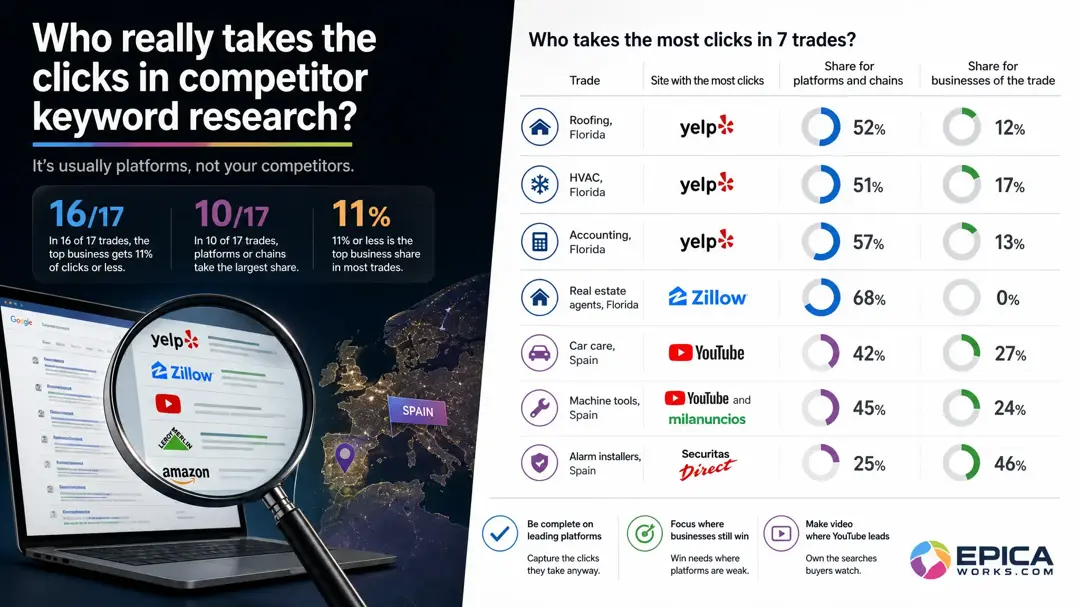
To see who really takes the clicks, read Google's first page for each buyer search and class every result: trade business, platform or chain, video, or other. Then pull ranking keywords for the platforms as well as for the three rivals the client names.
The brief usually arrives as a list of names. “Our competitors are Summit Roofing and the guy on Route 9; tell us what they rank for.” Run only those domains and the report answers the client's question while missing the sites that hold most of the first page, which may be a directory, a marketplace or a video channel the client never thought of as a competitor.
When you don't need this: if the client wins work by tender or through a handful of trade contracts, a click report changes little; spend the hours on the tender portals instead. If every search the client cares about is their own brand name, Search Console already answers it.
Start from the client's buyer searches, not their rivals
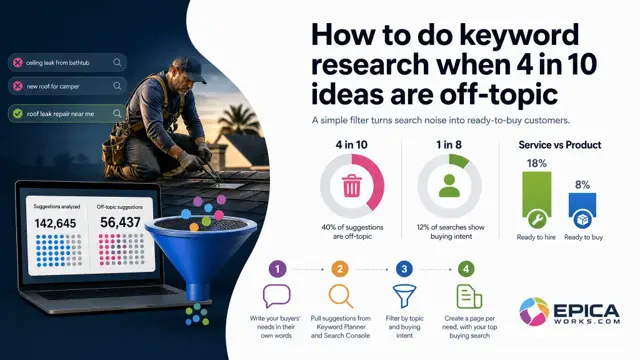
The report is built around searches, so list those first. Take the client's needs in their customers' words (“roof leak repair”, “roof replacement cost”), add the queries from the client's Search Console Performance report that match a service they sell, and keep the ones from people ready to buy or hire. Ten to twenty searches are enough for a first report; more than that and nobody reads the table.
Write the city or area next to each one. A roofer's first page in one metro can look nothing like the same search an hour away, so a report without the place reads the wrong market.
Check it: every search on the list is something the client would want the phone to ring for. If the client looks at a line and says “we don't do that”, it goes.
Read the first page and class every result
Search each line logged out, in a private window, with the location set to the client's area. Note the ten organic results, the local pack and anything above them, and give each site one result type: a business of the trade, a platform or chain (directories such as Yelp or Angi, marketplaces, national chains), a video, a maker or brand, or other.
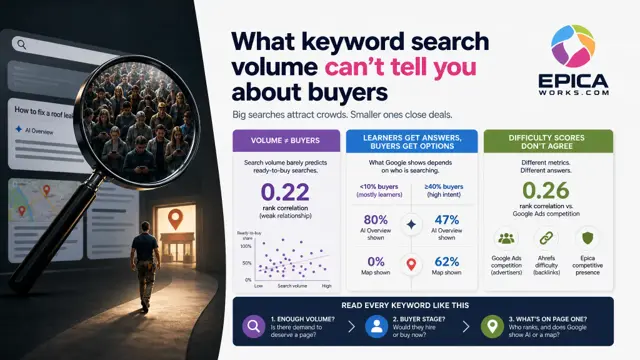
To turn positions into clicks, multiply the click-through rate of each position by the search's monthly volume from Keyword Planner, then add each site's estimated clicks across all the searches. Any published click-through curve will do as long as you use the same one for every client, so this quarter's report can be compared with the next. Say in the report that the clicks are estimates and give the date of the reading.
The test of this step is the sum: once every result has a type, add the estimated clicks by type. If platforms and chains hold more than the client's named rivals, that is the first line of the report, and the rest of it has to say what to do about them.
Pull ranking keywords for rivals and platforms
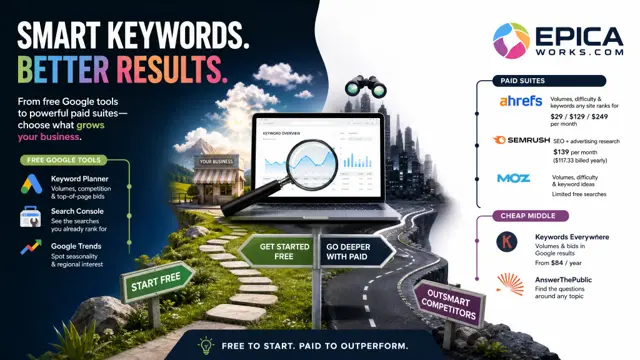
Enter a domain in Ahrefs Site Explorer or Semrush Organic Research and you get its ranking keywords, its position on each and an estimate of its traffic. Semrush's free account allows 10 requests a day across its reports, enough for a first pass on the client and two or three rivals.
For a platform, the whole domain is useless: a directory ranks for thousands of searches outside the client's trade. Enter the URL of the platform's own page for the client's service and city instead, the category page or the directory listing that showed up in your first-page read, and filter its keywords down to the client's services. What remains are the searches where the competitor is the platform, not a business.
Keep the business rivals in the report too. Next to a platform that holds a large share of the clicks, a rival with a sliver stops looking like the main threat, and the client sees which searches are worth fighting for on their own site.
Add an AI answers column to the report
The client will ask about ChatGPT in the same meeting, and a click table cannot answer it: the sites an AI answer cites are a different list. Fill the AI answers column from questions, not from the keyword export. Put the client's ten main buyer questions to ChatGPT and Gemini, logged out, with the town in the question, and write down every business, platform and publication each answer names and every site it cites. Use both, because they cite different sites.
One answer is one draw. Ask each question at least twice on different days and date every reading; a name that appears once is noise, a name that appears every time belongs in the report.
Then read the sources, not only the names. Drop government sites and the client's direct competitors; what is left (a directory, an association, a review site, local press) is where the client can get listed this month.
Recommend by who holds each search
Each search in the report gets one recommendation, decided by its result type:
- A platform holds it: make the client complete on that platform. Claim the profile, use the same name, address and phone as the website, and ask three recent customers for a review.
- Businesses of the trade hold it: give the need its own page on the client's site, answered at the top in the customer's words, with the price range, the area and photos of real jobs.
- A video holds it: the recommendation is a short video that does the job the search asks about.
- An AI answer names a source the client is not on: getting listed there is the task, before any new page.
Write the recommendations as tasks with an owner and a date, never as positions to reach. Nobody can promise first place, and a report that promises it is the one the client stops trusting first.
This week, add two columns to your report template, the result type holding each search and whether ChatGPT and Gemini name that site, and fill them for one client before the next monthly call. To check which result types lead in a client's trade before you start, read its card in Epica's industry directory.