To analyze a page for on page SEO, list the searches it already shows for in Search Console, then check that its heading, opening and images answer them. Work one page at a time, starting with the page that brings the best-paid jobs.
You have read the checklists with two hundred items and a score at the top, and you have one Saturday morning. The method below skips the score. It starts from what Google already thinks the page is about, then reads the page the way the person typing that search would, and ends with a short list you can reuse on every page of the site.
Start from the searches the page already gets
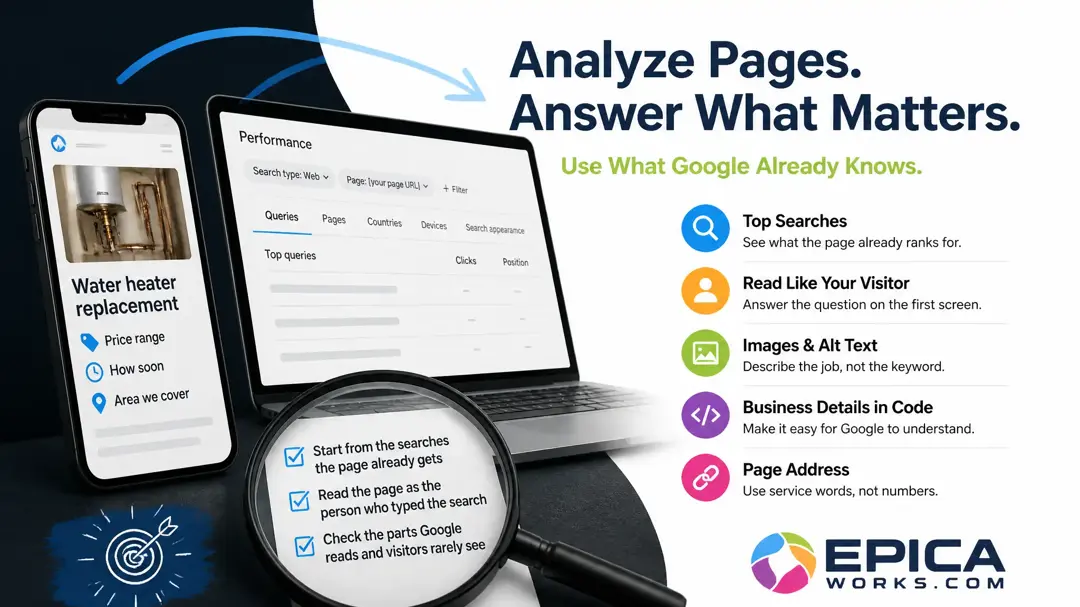
Open the Performance report in Google Search Console, choose Search results, and add a Page filter with the address of the page you are analyzing. Google's help describes exactly this move: “add a URL filter to the report to focus on the page(s) you're interested in.” Then open the Queries tab and sort by Impressions, so the searches Google shows the page for most come first.
Copy the top ten into a column, and beside each one write its clicks and its average position, which the report defines as “the average topmost position for pages from your site.” Three patterns tell you what to do next.
Searches on page one or two with almost no clicks are the cheapest win on the site: Google already connects the page to that search, and the result in the list does not persuade anyone to open it. Searches that have nothing to do with what you sell mean Google reads the page as being about something else, usually because the words a customer uses never appear in its text. A list with only your business name in it means the page is not matched to any buyer search yet, and the fix starts earlier, with whether Google can find and index it at all.
Read the page as the person who typed the search
Take the search at the top of your column, open the page on your phone, and read only what fits on the first screen. A plumber's water heater page that shows a stock photo, “Welcome to our family business” and a slider has used that screen on nothing the searcher asked.
That first screen should hold the answer to the question your customers ask most by phone about this service, in their words, with what only you can give: your price range, the area you cover, how soon you can come, and a photo of a real job with where it was. A buyer who finds that answer without scrolling has a reason to call; one who has to hunt for it goes back to the results and opens the next business.
Then read the headings alone, top to bottom. Each one should say what its section answers (“How long a water heater replacement takes”), not label it (“Our process”). The page should carry one main heading, and that heading should contain the words of your top search, not the name of your company.
Check it: show the first screen and the headings, nothing else, to someone outside your trade. If they can tell you what you do, where, and roughly what it costs, this part passes. This page is step four of the five checks for a website that brings no customers; if your pages fail an earlier step, start there.
The parts Google reads and visitors rarely see
Images come first, because most small business pages are mostly photos. Google's image SEO best practices ask for alt text that is “useful, information-rich content,” warn against filling it with keywords, and say a filename gives only “very light clues” about what the picture shows.
In practice, open each photo's settings in your site builder, find the alt text field, and describe the job (“new tankless water heater installed in a garage in Kissimmee”), not the keyword (“plumber Orlando best plumber”). Rename files from IMG_4482.jpg before you upload the next batch, and keep each photo next to the paragraph it illustrates.
Then the business details in code, the structured data that tells Google your hours, phone number and price range in a form it can read without guessing. Google's LocalBusiness documentation lists those properties and tells you to validate the code with its Rich Results Test and fix any critical errors. Paste your home or contact page into that test; if it finds no local business item, ask whoever built the site to add one. Keep expectations right:
Google does not guarantee that features that consume structured data will show up in search results.
The last hidden part is the page address. A short address made of the service words, such as /water-heater-replacement, tells a buyer what they are about to open; a string of numbers tells them nothing. Change the address of a page that already gets visits only with a redirect from the old one, or the visits you measured in the first step go to an error page.
An on-page SEO check list for one page
Copy this into a sheet, one row per page, and fill it as you go. A page passes when every cell in the last column is true.
| What to check | Where to look | It passes when |
|---|---|---|
| Top searches | Performance report, Page filter, Queries tab | at least three of the top ten describe what the page sells |
| Unclicked searches | the same table, position and clicks | each search on page one or two has an answer on the page |
| Main heading | the page itself | it holds the words of the top search, not your company name |
| First screen on a phone | your phone | price range, area and how soon are visible without scrolling |
| Headings | the page, read alone | each one says what its section answers |
| Photo alt text | the image settings in your site builder | each photo describes the job and the place |
| Business details | Rich Results Test | a local business item with no critical errors |
| Address | the browser bar | service words, no numbers |
💡 Start where the money is: analyze the page for the job you most want more of, not the home page. The home page usually shows for your name, which people find anyway.
Who can skip this, and how to tell it worked
Skip the page-by-page work if your site has no separate page for each service yet: one long services page cannot answer three different searches, so splitting it comes first. Skip it also for an online shop with hundreds of product pages, where a crawler that checks every page at once does this job better than a person with a sheet.
Four weeks after you change a page, open the same Performance report, keep the Page filter, and compare the last 28 days with the period before in the date filter. Look at the clicks on the searches you marked in the first step. Then ask the way your customers do: log out of ChatGPT, type your top search with your town, and note which businesses and sites it names; repeat on two more days, because one answer proves nothing.
This weekend, pick your best-paid service, export its top ten searches from Search Console, and rewrite the first screen of its page so the three most frequent ones are answered before any photo or slogan.