Questions
How to get clients when Google answers with AI first
· 5 min read
Start with your free Google Business Profile, then make your site easy to call from, then give the question customers ask most its own page, because that page is what Google's AI summary draws on before any link. Pay for ads last, once you know which searches bring calls.
The usual situation: the phone rings less than it used to, and everyone from your accountant to your nephew says “just get on Google.” The advice is right and too vague to act on. It breaks into four jobs, done in this order, each with a way to check it worked.
Claim your Google Business Profile before anything else
Your Google Business Profile is the listing that shows on Google Maps and on the right of a search for your name, and Google states on its Business Profile page that creating one is free. It comes first because every other channel ends there: when a neighbor recommends you, the next thing that person does is search your name.
Fill it the way a caller would read it:
- The business name exactly as it is on your sign and your invoices.
- The primary category that names your main service, not a broad one.
- The service area, town by town, the places you really drive to.
- Hours, the phone number you answer and a link to your site.
- The services list in the words customers use on the phone: “water heater replacement,” not “plumbing solutions.”
- A handful of photos of real jobs, taken this year.
Then ask three recent customers for a review there. To check it, open a private window on your phone, search your business name plus your town and look for your profile with the right phone and hours. Search your main service plus your town too, and note whether you appear in the block of businesses on the map, the local pack.
Make every visit easy to turn into a call
Lead generation sounds like an industry of its own. For a small business it is a short path: someone lands on your page or your Maps listing and either calls, fills out a form or sends a message. Most of the leaks on that path are small, and you can find them in ten minutes.
Open your own site on your phone and tap the phone number: it should open the dialer, not do nothing. Count the fields on your contact form and keep only what you need to call back, usually a name, a phone number and a line about the job. Read the last screen of each service page and make sure it says what to do next, with the number right there.
Then test the reply. Ask a friend to send a request through the form on a weekday and time how long your answer takes. Aim to answer the same day.
Buying lead lists and prospecting software belong to a different question, how to find strangers to contact. Skip them here.
Give your most-asked question its own page
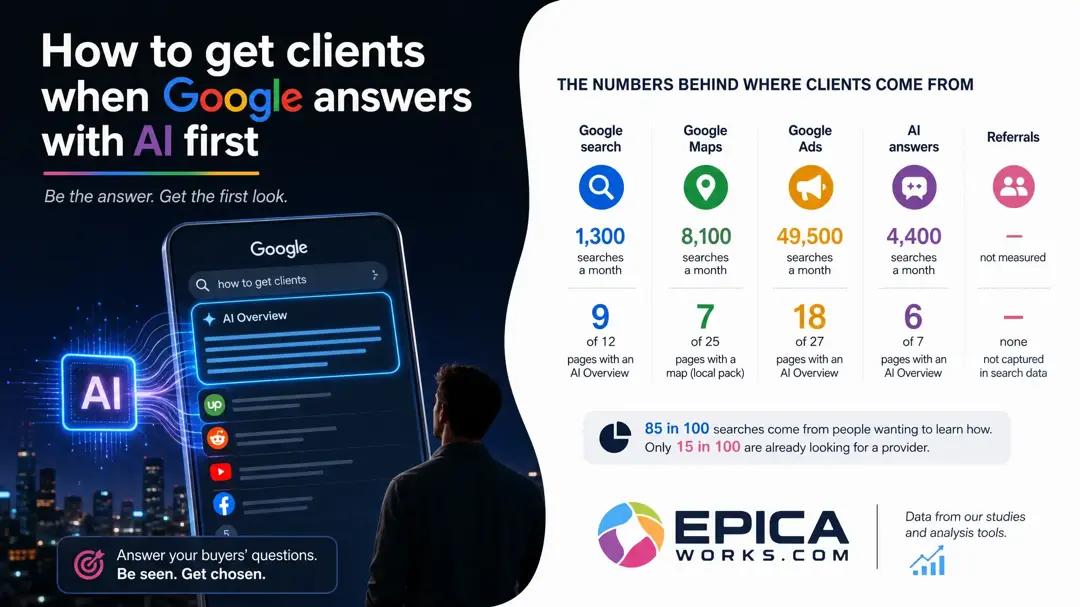
This is the step most owners skip, and it is the one Google's AI summary depends on. On 9 of the 12 US results pages we read in October 2026 for owners who want more customers, Google opened with an AI Overview before the first link, so the pages that summary is written from get read first. Google says there is no trick to being one of them:
There are no additional requirements to appear in AI Overviews or AI Mode, nor other special optimizations necessary.
The same Google page on AI features says the page has to be indexed and eligible to show with a snippet, the short extract under a result's title. So the work is ordinary and specific:
- Pick the question customers ask most often by phone, such as “how much does a new water heater cost?”
- Answer it in the first two sentences of its own page, in their words, with your real price range.
- Add what only you can give: your service area, how long the job takes, photos of jobs you did.
- Give each service its own page with a plain title, and keep prices, services and area in the page text, not only inside images or PDFs.
To check it, paste the page's address into the URL Inspection tool in Google Search Console a few days after publishing: it should say the URL is on Google. If it does not, request indexing from the same screen.
Should you pay for ads yet?
Not while steps one to three are missing. A click you pay for lands on the same page that has to turn it into a call, so a profile without services or a form with ten fields wastes the budget before it starts.
Pay once you already get some calls and know which searches bring them. The Performance view of your Business Profile lists the searches people used to find you; those are the words to bid on first, with a monthly cap you can afford to lose while you learn. Google's own question on these results pages, “Is $500 a month enough for Google Ads?”, has no honest single answer, because ad prices move by trade and city. Set the cap, run it for a month and compare calls with spend.
You may not need ads at all. If referrals and repeat customers already fill your calendar, the profile and a site that is easy to call from are enough for now. If you serve one small town, a complete profile with recent reviews does most of the work.
Start from what buyers in your trade ask
A roofer, a dentist and a lawyer each meet a different mix of maps, ads and AI answers, and their buyers do not type the same searches. That is why the most-asked question should come from your own calls first, and from your trade second.
Your task this week: write down, word for word, the three questions callers asked most in the last month, and turn the first one into the title of a new page with its answer in the opening lines. To choose the words of the title, compare your three questions with your trade's searches in the directory of trades that Epica keeps.