Google Business Profile optimization you can do in a week
· 5 min read
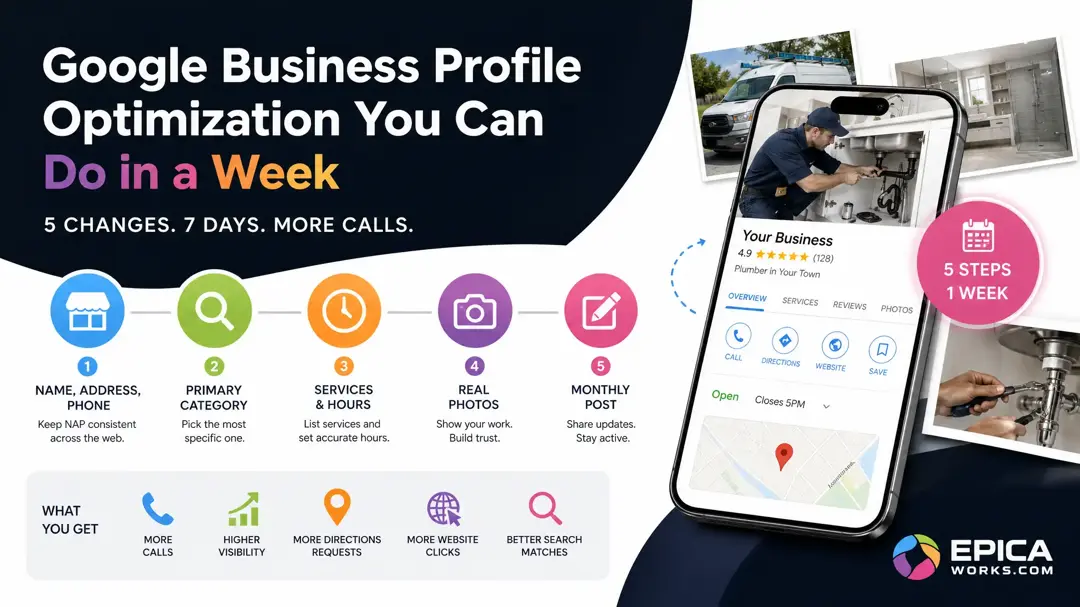
Google Business Profile optimization means getting five fields right: the name, the primary category, services and hours, real photos and a monthly post. Each is something you edit yourself, in an evening or two, and Google's own rules say what belongs in it.
You searched your main service and your town, the map came up with three businesses, and yours was missing, or it was there with a blurry photo and last year's hours. The profile is free and you already control it. What usually holds it back is a handful of fields filled in once, years ago, and never opened again.
Settle one thing before you start. Google's guidelines for representing your business allow a profile when your business “has a physical location that customers can visit, or travels to customers where they are”.
A shop that only sells online, or a consultant who never meets clients, is not eligible, and the week is better spent on the website. If your profile is not claimed and verified yet, do that first at business.google.com.
Make the name, address and phone match your website
Start with the name, because it is the field owners break most often. The same guidelines ask for the name customers know you by and list what must not be added to it: marketing taglines, phone numbers, website addresses, business hours and special characters. “Garcia Plumbing” stays “Garcia Plumbing”, never “Garcia Plumbing Best Emergency Plumber Tampa”.
If you work at your customers' homes and have no shop, the guidelines say a service-area business should hide its address from customers. Clear the address, then list the towns or ZIP codes you actually drive to as your service area. For the phone, use a local number that rings at your business, not a call center line.
Then make the same name, address and phone appear everywhere a buyer or Google can read them: your website footer, the profile and every directory that lists you. To check it, copy each one from the profile into a note, paste the website footer under it, and compare them letter by letter. Where they differ, fix whichever is wrong today.
Pick the primary category by the job that pays
The category is the field that decides which searches you show up for on the map. Google's help page on managing your business category says it outright: “The categories you select affect your local ranking on Google.” Choose the most specific one that fits your main business; the page's own example is “Nail salon” rather than “Salon”.
To change it, open your profile, click Edit profile, then Edit next to Business category, type the service and pick from the list. You cannot invent a category, so if the exact one is missing, take the closest general one. Add a few additional categories only for other services you really sell, not one per product.
Two cautions before you press Save. The same page warns that adding or editing a category might ask you to verify your business again, so change it on a day you can answer Google's check. And open a private browser window, search your main service with your town the way a customer would, and read the category printed under each business on the map: if all three share one you lack, that is the category to add.
Fill in what buyers read before they call
A buyer who opens your profile wants three answers: do you do this job, are you open, and why you. The fields that give them are services, hours and the description.
Under services, list each job in the words a caller uses on the phone, one entry per job, starting with the work that earns you the most. Set your regular hours, and add special hours for every holiday this season so nobody drives to a locked door.
The description is the paragraph Google shows as “From the business”. Google's page on editing your Business Profile caps it at 750 characters, rules out links and HTML, and asks you to focus on the business rather than promotions or prices.
Open it with what you do and where, then the one thing a competitor cannot claim: the brands you install, the years in the trade, the towns you cover. Google reviews edits before they go live, so look at the public profile again two or three days later.
Photos of real work, and one update a month
A profile with photos of your own jobs looks like a business that answers the phone; a profile with one logo looks abandoned. Take them on your phone in daylight: the outside of your shop or your van, the team, and jobs before and after, from this year.
💡 Shoot what the customer will see at the door: a photo with your van, sign or uniform in frame lets a buyer recognize you when you arrive, and it is the picture they remember when they compare three names on the map.
Then post once a month. In the profile, choose Posts, then Add post, then Update: one recent job, one photo, two lines on what you fixed and where, and a Call button.
An Offer needs dates and an Event needs start and end times, so keep to updates unless you run either. Reviews matter as much as any field here; ask three recent customers for one this month, and answer each in your own words.
Check the profile is bringing calls
Give the changes a month, then open your profile at business.google.com, click Performance, choose the last 28 days and Apply. The report counts calls from the call button, website clicks, requests for directions, views on Search and Maps, and the searches people used to find you.
Read the searches first. If every term is your business name, the map only shows you to people who already know you, and the category and services are where to go back to.
If views rose but calls did not, the photos, hours and description are not convincing the buyer who looked. Ask every new caller where they found you and note the answer next to the date, because the report cannot tell a call that came from a lost customer.
Your profile covers one stage of the five a website needs to bring customers; the short self-test in the guide on why a website brings no customers shows whether the break is earlier or later than the map.
Tonight, fix the name and phone so they match your website footer. On Wednesday, check the map in a private window and set the primary category. On Saturday, photograph the job you are on, publish it as an update with a Call button, and write the date in the corner of your calendar four weeks out, labeled “Performance: calls and searches”.