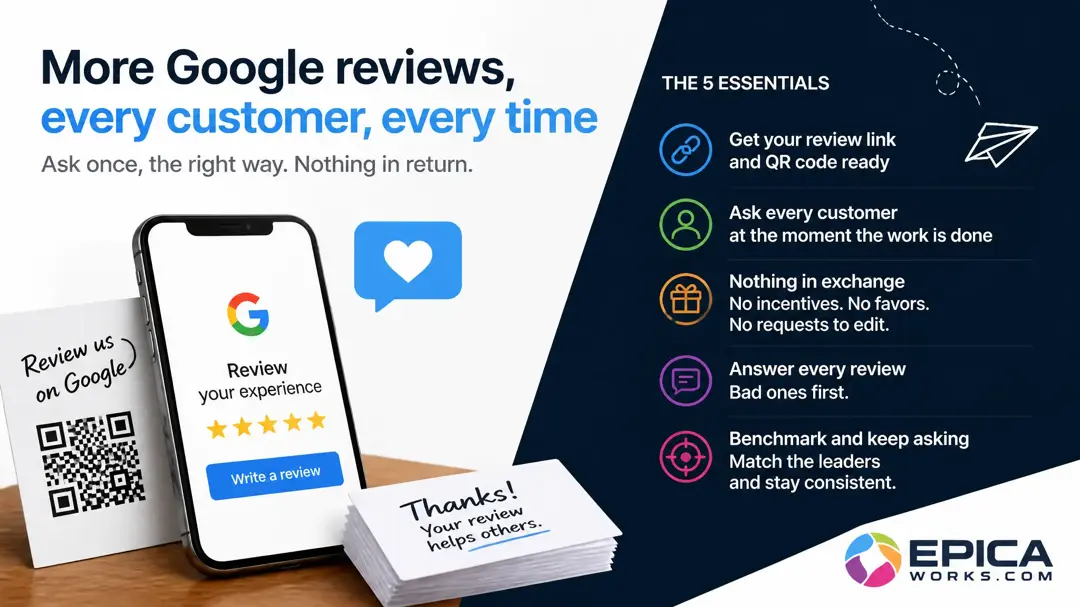
You get more Google reviews by asking every customer for one as the job closes, with your profile's review link, and by never offering anything in return. Most businesses with few reviews never asked, or asked once in a busy week and stopped.
Get your review link and QR code ready tonight
A review request fails when the customer has to search for you, find the profile and work out where the stars are. Google gives every verified profile a direct link that opens the review box, and that link is the whole tool.
Google's help page on creating a link or QR code to request reviews gives the path. On a computer, go to business.google.com, open your profile, select Read reviews, then Get more reviews. Select Copy for the link, and right-click the QR code to save it as an image.
The QR code can only be made from a computer browser, not from your phone.
Save the link in three places where you will actually reach for it: a note on your phone, the signature of the email you send with invoices, and the template of your payment receipt. Print the QR code on the back of a business card or a small sticker for the van, the counter or the clipboard you hand over for a signature.
To check it works, open the link in a private window on your phone. The review box with your business name should appear after one sign-in. If it lands on a search page instead, copy it again from the profile; a link pasted from the address bar is not the same thing.
Ask every customer, at the moment the work is done
The best time to ask is the minute the customer says thank you: the leak is fixed, the haircut is done, the paperwork is signed. A request sent a week later competes with everything else in their inbox, and the details they would have written are gone.
Ask every customer, not only the ones who seemed happy. Google's Maps content policy says merchants may not “discourage or prohibit negative reviews, or selectively solicit positive reviews from customers.” Sending the link only to the customers you expect to give five stars is exactly that, and so is the common setup where a form asks “how did we do?” and only the high scores get sent on to Google.
Say it in person first, then send the link the same day by text, because a text gets read and the link opens on the phone they already hold. Something like this works for most trades:
“Thanks for having us today, Maria. If you have a minute, a Google review helps other people in Tampa find us: [link]. Tell them what we fixed and how it went. Dan, Reyes Roofing.”
Name the job, name the town and sign it yourself. A review that says what was done and where tells the next buyer more than a line of stars, and you asked for an honest account, not a rating.
Two things a busy shop gets wrong. The same policy bars pressuring customers to leave a review while they are still on the premises, so never hand them a tablet at the counter and wait. And it bars asking staff to collect a set number of reviews: give your team the card and the habit, not a quota.
The lines Google and the FTC draw
Google is stricter than US law here, and Google's rule is the one that removes reviews from your profile. The same Maps policy does not allow merchants to “offer incentives, such as payment, discounts, free goods and/or services” in exchange for posting any review, or for revising or removing a negative one. Google treats it as fake engagement, and fake engagement is removed.
The FTC's questions and answers on the Consumer Reviews and Testimonials Rule allow an incentive under federal law only if there is no express or implied requirement that the review say something positive. That leaves room on other sites, never on Google. So on your Google profile the rule is simple: nothing in exchange, no discount on the next visit, no raffle entry, no free coffee.
The rest follows from the same idea: no reviews written by family, staff or friends posing as customers. No asking a customer to edit a bad review in return for a refund. No paid review packages from anyone who promises a number by a date.
💡 Keep the profile in your own account: whoever sends review requests for you, a helper, an assistant or an agency, add them as a manager of the profile rather than handing over your login. If they stop working for you, the reviews and the replies stay where they are.
Answer every review, the bad ones first
Replies are part of getting more reviews, because the next customer reads them before deciding whether to leave one. A profile where every complaint got a calm, specific answer tells a buyer what happens when something goes wrong, which is the question behind most bad reviews.
To reply, open your profile, select Read reviews, then the reply icon next to the review. Google checks every reply against its policies before it goes public, so it may not show at once; don't rewrite it twice because it hasn't appeared yet.
For a bad review, read your own records of the job before typing a word. Then answer in four short moves:
- Use the customer's name and thank them for telling you.
- Say what happened as you see it, admitting what was your mistake and nothing that wasn't.
- Say what you can do and what you can't, and invite them to call or write to you privately.
- Sign it with your name or initials.
Never post the customer's private details, and never argue in public. If a review breaks Google's policies, because it was written by someone who was never a customer or it contains abuse, flag it from the same Read reviews screen; a review you simply disagree with stays.
For good reviews, skip the stock “Thanks for the five stars!”. Keep the reply short and add something: the name of the person who did the job, or an answer to the question the reviewer raised.
How many reviews do you need?
There is no fixed number. The one that matters is the number of the businesses a buyer compares you with. In a private window, search your main service and your town the way a customer would, and write down the review count and the date of the newest review for each of the three businesses on the map.
That is your target and your pace: if the leader has steady reviews every few weeks, a burst of ten this month and none after looks thin next to it. Then do what Epica does when it checks who gets recommended: ask the way your customers do. Put the same question to ChatGPT while logged out, and note which review sites it cites besides Google.
If one directory keeps appearing, a few honest reviews there count too.
If you sell only online and never meet customers in an area, the map is not where you win buyers; the guide on why a website brings no customers shows where your break is instead.
This week, copy your review link into your phone and your invoice email, print the QR code on fifty cards, and text the link to every customer from the last 30 days, all of them. In a note, write today's review count beside the three counts from the map, and repeat the count on the first of next month.