How much SEO you can do yourself with free SEO tools and AI
· 5 min read
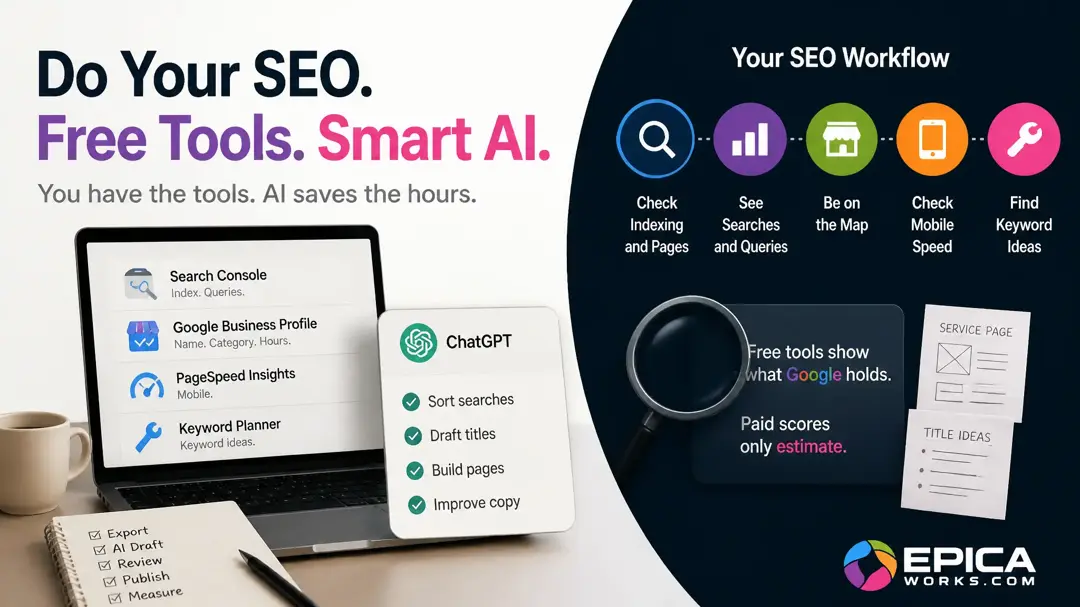
A small business can do most of its own SEO with free Google tools, while ChatGPT drafts the text and sorts the data, as long as you check every line it writes. The free tools show what Google holds; paid ones only estimate it.
You have a website, a few evenings and no budget for an agency. That is the situation Google's own Do you need an SEO? page has in mind when it says: “If you run a small local business, you can probably do much of the work yourself.” The catch is picking the right tasks, in the right order, with tools that tell you whether each one worked.
The free tools, one per job
Every job an owner can do alone has a free Google tool behind it. Open them in this order, because each one answers a question the next one depends on, the same order as the five checks of why a website brings no customers.
| The job | The free tool | Where to look first |
|---|---|---|
| Is Google holding my pages? | Search Console | Indexing, then Pages |
| Which searches show my site? | Search Console | Performance, then Queries |
| Am I on the map in my area? | Google Business Profile | the name, the primary category, the hours |
| Does the page load on a phone? | PageSpeed Insights | the Mobile tab |
| What words do buyers type? | Keyword Planner | keyword ideas |
Google Search Console is the one to set up tonight, in your own Google account, because every other step reads from it. Keyword Planner lives inside Google Ads and asks for billing details before it shows ideas, though planning keywords does not require running an ad.
Treat a paid tool's score as an estimate, never as Google's verdict. The same Google page says these tools “don't have access to Google's internal ranking data”, and that Google does not endorse any of them. A checker's score is the vendor's formula; the Pages report in Search Console is Google telling you what it did with your site.
Where ChatGPT saves you the hours
The slow part of doing your own SEO is not the clicking, it is the reading and the writing. That is where an AI assistant earns its place, on four tasks.
- Sort your searches. In Search Console, open Performance, set the last three months and use the export button to download the Queries table. Paste it into ChatGPT and ask it to group the rows by service and list the searches with many impressions and few clicks. Those are the pages to fix first.
- Draft a title and description per page. Give it the service, the town and the one question callers ask most, and ask for three titles under 60 characters. Pick one and edit it until it sounds like you on the phone.
- Turn your answers into a page. Tell it, in your own words, what you charge, where you work and what goes wrong on the job. Ask it to organize that into a service page; the facts stay yours, the structure is its job.
- Rewrite what reads like a brochure. Paste your current home page and ask which sentences a buyer could not act on. Cut those.
The rule over all four is Google's. Its guidance on using generative AI content says it is “critical to manually factcheck and review all AI-generated content for accuracy and trustworthiness before publishing”, titles and descriptions included. A price, a license number or a town the assistant invented is worse than a blank, so read every line before it goes live.
The same page warns that producing many pages without adding value for users may break Google's spam policy on scaled content. Ten near-identical town pages written by a bot are exactly that.
Can ChatGPT do an SEO audit?
It can review what you hand it, not what Google holds. ChatGPT cannot open your Search Console, so it does not know which of your pages are indexed, which searches show you or where you rank. An audit it writes from a bare web address is a list of common problems, some of which you may not have.
Give it the evidence instead: the text of one service page, its title, and the Search Console rows for that page. Then ask a narrow question: which question a buyer asks about this service does the page not answer, and which search in the list has no page of its own. That is an audit you can act on, because every finding points back to your own data.
There is one check only an assistant can run, because the assistant is the thing being checked. Open ChatGPT logged out and ask five questions the way your customers would, with your town in each one, then write down every business and every site the answer names.
Run the same five in Gemini, since the two cite different sites. One answer is one draw, so repeat the questions next month and date each reading.
When doing it yourself stops paying
The do-it-yourself route covers a site of a few dozen pages that sells a handful of services in one area. It is not the right route when the risk is structural: moving to a new domain, rebuilding the site on a new platform, a Manual actions notice in Search Console, or a site with hundreds of product pages. A mistake there can drop pages out of Google for months.
It also stops paying when the evenings run out. If the export has sat unread for a month, the tools were never the problem.
When you do bring someone in, ask for the tasks, not a ranking: Google's page says nobody can guarantee first place, and that during an audit you should give only read access to Search Console. Keep every account in your own name.
This week, one export and one page
Block out an hour before Friday. Export three months of queries, paste them into ChatGPT and pick the service with the most impressions and the fewest clicks. Rewrite that page's title and its first paragraph with the facts only you know: your price range, your area, the question callers open with.
Then write the date and the page's clicks for the last 28 days on a note. Picking the service is easier when you know what buyers in your sector actually ask, which is what our trade cards list, search by search.