How to check website traffic and run a website speed test
· 5 min read
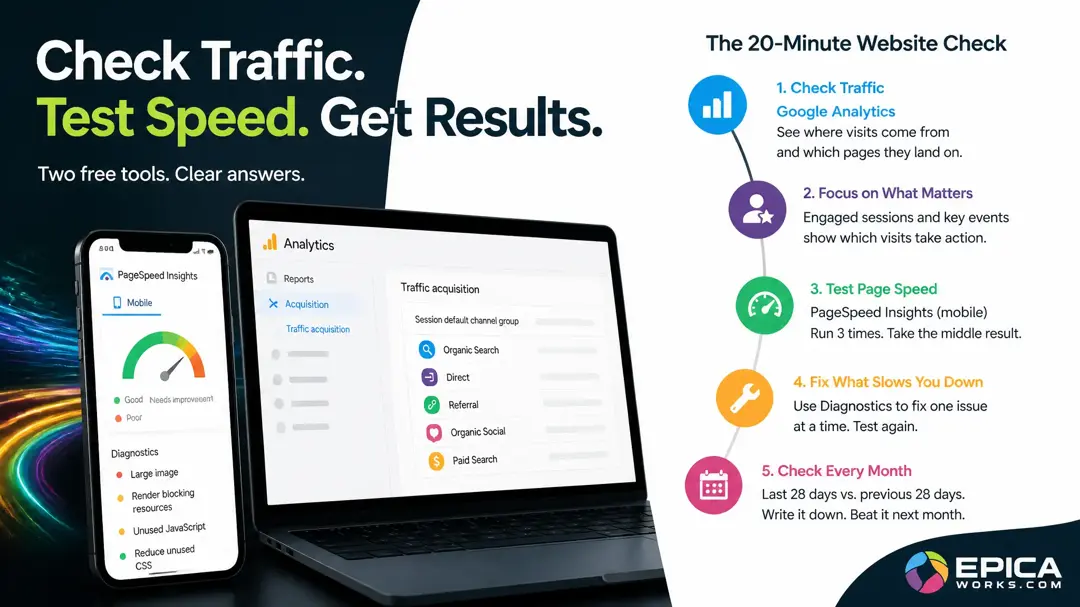
To check website traffic for free, open Google Analytics at Reports, Acquisition, Traffic acquisition, then test a page in PageSpeed Insights on mobile. Twenty minutes tells you where visits come from and whether the page they land on is slow enough to lose them.
You built the site yourself, or a friend did, and the phone is quiet. Before paying anyone, find out two things: are people arriving at all, and does the page hold them once they do? Both answers sit in free Google tools.
Where to see your visits in Google Analytics
If nobody ever installed Analytics, that is step one: create a property for your website, copy the tag Google gives you into the site's settings (most builders have a field called Google Analytics or tracking ID) and wait a day. It counts only from the moment it is installed, so there is no history to recover. Create the account with your own Google login, not your web designer's; if you part ways, the data stays with you.
For proof that it works, open the Realtime report and load your home page on your phone with mobile data. You should appear as one active user within a couple of minutes. If you don't, the tag is not on the page.
Once data flows, go to Reports, then Acquisition, then Traffic acquisition. Each row is a channel, the route a visitor took to reach you, and the table shows sessions and engaged sessions for each one. Click the plus sign next to the first column and add “Page path and screen class” to see which page each channel lands on.
| Channel row | What it means | What to check |
|---|---|---|
| Organic Search | someone clicked you in Google or Bing results | which pages they land on; your service pages should be there |
| Direct | they typed your address or used a bookmark | mostly people who already know you |
| Referral | they clicked a link on another site | which sites; a directory or association that sends visits is worth a better profile |
| Organic Social | they came from Facebook, Instagram and the like | whether those visits ever reach the contact page |
| Paid Search | your Google Ads clicks | whether the ad page is the one that loads slowly |
Read the visits that could turn into calls
A total visits number is the least useful line in the report. Look at engaged sessions instead, the visits where someone stayed, read or clicked, and at which pages those happen on. A month with fewer visits but more of them on the price page is a better month.
Then mark the actions that matter as key events: a submitted contact form, a tap on your phone number. Analytics lists the events it records under Admin, then Events, where each one can be marked as a key event; if your form or phone link is not in that list, ask whoever built the site to send it as an event. From then on the same report shows how many sessions per channel ended in one, which is as close as the free tool gets to counting customers.
Open Referral and read the source list each month. A line such as chatgpt.com or gemini.google.com is someone who clicked through from an AI answer, and customers who arrive that way tend to say they found you “online”.
Check again every month on the same day, set the date range to the last 28 days and compare it with the period before. The Google searches behind the Organic Search row live in Search Console, a separate tool and a separate check.
How to run a website speed test that means something
Paste your most important page, not only the home page, into PageSpeed Insights and read the mobile result first, since a buyer looking for you nearby is often on a phone. The report has two parts and they answer different questions.
The top part is real visitor data, collected from Chrome users over the previous 28 days. A small site often shows nothing there: Google's About PageSpeed Insights says a page may lack data when it is new or has too few samples from real users. That is not a fault, only a sign you have to rely on the second part.
The second part is the lab test and its score out of 100. Google's own bands are 90 or above good, 50 to 89 needs improvement, and below 50 poor. The score moves between runs, because the test depends on network and hardware at that moment, so run it three times and take the middle result before you decide anything.
💡 Test the page your ads or your Google profile point to: that is the page a stranger sees first, and it is often a heavy landing page nobody has tested since launch.
What to do with a slow result
Scroll to the Diagnostics list under the lab score. Each item names a file or an element on the page, so you can act on it without knowing the jargon. On small business sites the usual culprits are a hero photo uploaded straight from a camera, a video that plays on load, chat or booking widgets that load before the text, and several fonts.
Fix the one that names your largest image first: resize it to the width it actually displays at and save it in a compressed format, which most builders do when you upload again through their image tool. Then run the test again three times and compare the middle score with the one you wrote down. If you pay someone to run the site, send them the PageSpeed link for that page and ask for one item fixed at a time, not a new theme.
The real visitor section changes slowly, since it covers four weeks of visits. Give it a month after a fix before judging it.
When these checks won't help
Both tools look at your own site. The traffic checkers that promise numbers for a competitor's site estimate them from panels and models, so treat them as a rough comparison of size, never as a count. If what you want is who Google or ChatGPT shows instead of you, traffic numbers will not answer it.
This is also not for you if visits arrive, they land on the right pages and the speed score is green, and the phone still doesn't ring. Then the problem is what the page says or whether you get named at all, which the five checks for a website that brings no customers walk through.
This week, confirm the Analytics tag with the Realtime test, mark the contact form and the phone tap as key events, and run your best-paying service page through PageSpeed three times. Write the middle score and the engaged sessions on one line, dated, so next month's check has something to beat.