Social media management for a small business
· 5 min read
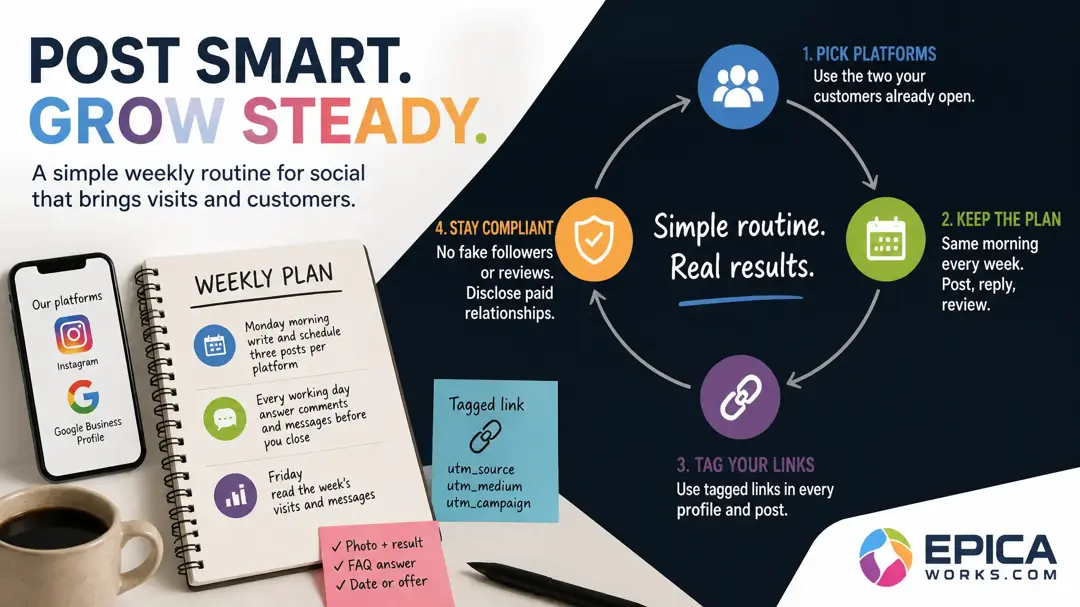
Social media management for a small business is a weekly routine: one or two platforms your customers use, a plan you can keep and every message answered.
Run that way it fits in one morning a week, and with tagged links you can see within a month which posts bring visits and messages before paying anyone to do more.
Pick the platforms your customers already open
Social media marketing means using your business accounts on Facebook, Instagram, LinkedIn, TikTok or Nextdoor to stay in front of people who may buy from you. Managing it means deciding what goes out, when it goes out and who answers the replies.
Start with two platforms at most. Over the next week, when a customer pays, ask which app they open most during the day and whether they follow any local businesses on it. Write the answers on one sheet; after ten or so, the two platforms usually pick themselves.
If you serve a local area, count your Google Business Profile as one of the two. It takes posts and photos, and it sits on the map where people searching for your trade already look. A third platform you post on once a month does more harm than none: an empty feed reads as a closed shop.
A weekly plan you can keep
The plan that survives is the one booked like a job. Block the same morning every week, write the posts in one sitting and schedule them with the platform's own scheduler, so nothing depends on remembering on a busy Thursday.
| When | Task | What it produces |
|---|---|---|
| Monday morning | write and schedule three posts per platform | the week's feed, done |
| Every working day | answer comments and messages before you close | no question left overnight |
| Friday | read the week's visits and messages | one line in your log |
Three kinds of post carry most small businesses: a finished job with a photo and one sentence on the problem it solved, the question customers ask most with your answer, and a date or offer with a deadline. Ask permission before a customer, their home or their car appears in a photo, and keep the yes in writing.
Replies are part of the work, not an extra. A message asking for a price that waits two days is a customer who called someone else, so set notifications for messages only and turn the rest off.
Tag your links so you can see what social brings
Followers and likes tell you who saw a post, not who came to buy. The number that matters is visits and calls, and tagged links are how you see the visits. Google Analytics reads three campaign parameters on any link you share, and its help page on URL builders explains each: utm_source is the referrer, utm_medium the marketing medium and utm_campaign the product or promo.
Put a tagged link in each profile and in every post that links to your site, for example yoursite.com/?utm_source=instagram&utm_medium=social&utm_campaign=profile. Keep every value lowercase: Google notes that parameter values are case sensitive, so Instagram and instagram would show as two sources.
To check it worked, open the link yourself from your phone, then the next day go to Acquisition, then Traffic acquisition, in Google Analytics and look for instagram / social. For calls, ask every new caller where they heard of you and add it to the Friday line. Compare each month with the one before, the same way every time, because a single good week proves nothing.
What the FTC says about followers, reviews and paid posts
Shortcuts here carry legal risk. The FTC's 2024 rule on fake reviews and testimonials prohibits buying or selling fake indicators of social media influence, such as followers or views generated by a bot or a hijacked account, and bars rewards conditioned on writing a review. The agency can seek civil penalties against knowing violators.
The same goes for posts you pay for in kind. If you give a local creator a free service, or your staff post about the business, the FTC's Disclosures 101 for Social Media Influencers says the relationship must be disclosed with the post itself, not only on a profile page and not mixed into a group of hashtags. Brief anyone who posts for you on that before the first post goes out.
When to hand it to a freelancer or an agency
Social media is not the first fix for every business. If your calendar is full, or your calls come from Google searches and the map, spend the morning on your Business Profile and reviews instead; social keeps existing customers close more than it finds new ones for a plumber or a roofer.
Hand it over when you have kept the plan for a month, the tagged links show visits, and you still cannot find the morning. A freelancer usually covers one or two platforms; an agency adds paid social and design. Either way, ask for the tasks, not the promise: how many posts a week, how fast replies go out, and which line of visits and messages you will see each month. Cost is a separate question with its own answer; settle what you are buying first, then compare quotes using the checks in choosing marketing help.
Keep the accounts in your name. Create each business page or profile under your own login, then add the freelancer or agency as a user, so the page, its followers and its messages stay with you if the contract ends.
This week, ask five paying customers which app they open most, set up one tagged link for your busiest profile, and book next Monday morning for the first three posts.