How to plan content with pillars, clusters and a calendar
· 5 min read
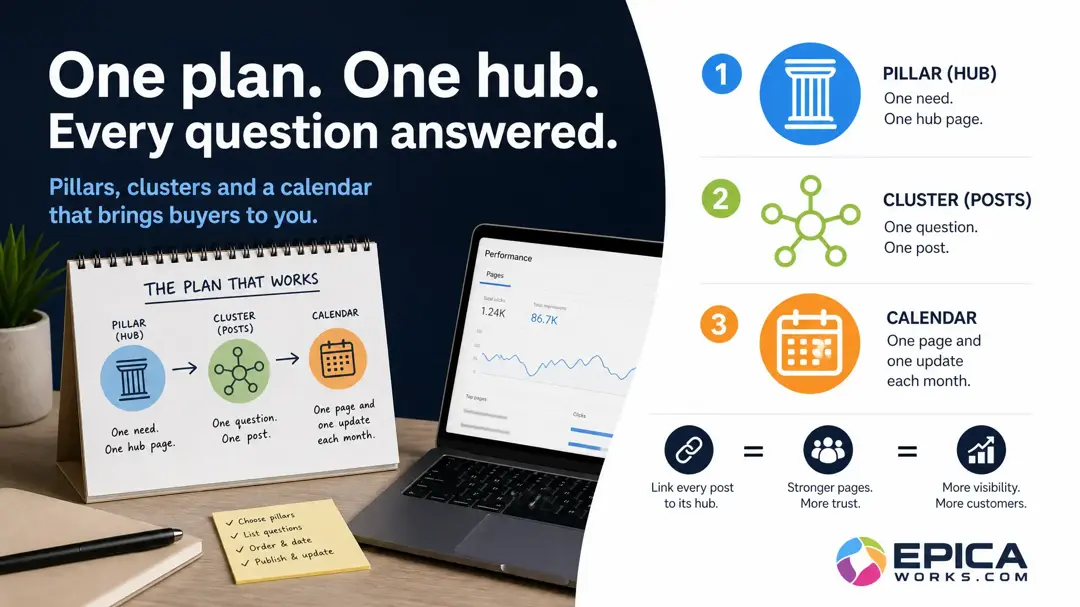
Plan content as one hub page per buyer need, one post for each question buyers ask about it, and a calendar that adds one page and updates one page a month. The plan fits in one sheet, and the hub comes first because every post links back to it.
You have written a few posts when there was time, each on whatever came up that week, and none of them points to the others. A content plan fixes the order, not the writing: which page comes first, which questions hang under it, and what goes live on which date. Marketers call the hub a content pillar and the posts around it a cluster; the names matter less than the rule of one need per hub and one question per post.
Choose your pillars from what you sell
A pillar is one need a buyer pays you to solve, written the way a customer says it: “fix a leaking roof”, not “roofing solutions”. Its page, the hub, answers the need as a whole: what the job involves, what moves the price, how to choose who does it, with your price range and the area you cover in plain text.
Three to five pillars are enough for most small businesses, one per service that brings in real money. Take them from your invoices: the jobs you did most last year, plus the one you want more of. A pillar for something you don't sell is a page that gets read and never rings, however often it is searched.
Check it: read each pillar to whoever answers your phone. If they can name the last job that matched it, keep it; if they can't, cross it out.
Hang one post per question under each pillar
The cluster is the list of questions a buyer asks on the way to that need, each answered on its own page. Fill it from three places, in this order: the questions you hear by phone and on quote visits, the “People also ask” box when you search the need with your town while logged out, and what ChatGPT and Gemini tell a buyer to check before hiring for it. Deciding which of those deserve a page first is what the guide to what to publish walks through; here each one only needs a row.
Put every question on its own row of one sheet. These six columns are the whole template:
| Column | What goes in it |
|---|---|
| Pillar | The need the question belongs to |
| Question | In the customer's own words |
| Stage | Learning, comparing or ready to hire |
| Page | The address once it exists, or “hub” if the hub answers it |
| Publish | The date it goes live |
| Checked | The last date you read its numbers |
Two questions with the same answer are one post, so merge their rows. A question the hub settles in a paragraph stays in the hub, and it earns a page of its own only when the answer needs steps, a price table or photos. Check it: no two rows point to pages that would say the same thing.
Link every post to its hub, and the hub to every post
Links are what turn a pile of posts into a cluster. Each post links to its hub once, near the top, with the need as the link text, and the hub links to each post with the question as the link text. Posts under the same pillar link to each other where a reader would want the next answer, never across pillars just to add links.
Every page you care about should have a link from at least one other page on your site.
Check it: open the hub and click through to every post in its cluster. A post that can only be reached from the blog archive gets its link on the hub before you write anything new.
Turn the sheet into a calendar you can keep
Order the rows before you date them. The hub goes first, then the post for the question asked most by phone, then the ready-to-hire questions, then the learning ones. The calendar is that order with dates on it, paced by the evenings you really have rather than by a posting frequency someone recommended:
| Time you have each month | What the calendar holds |
|---|---|
| One evening | One update to a page that exists |
| Two evenings | One new page and one update |
| Four evenings | Two new pages and two updates |
Every month gets an update, because a page that already shows up is cheaper to improve than a new one is to write. Open Search Console's Performance report, switch to the Pages tab, and pick the page with many impressions and few clicks; its title and first sentence are that month's update. Then ask ChatGPT the same customer questions you asked last month, logged out, and note whether the hub or its posts are cited, with the date.
Move a page's date only when its content really changed. Google's guidance on helpful, people-first content lists changing dates “to make them seem fresh when the content has not substantially changed” among the habits of pages made for search engines rather than for people.
💡 Keep the dates in the sheet: the Publish column is the calendar, and a reminder on the first Monday of each month is the only other tool it needs. A plan split between a sheet and a separate calendar app is the first one to drift.
Which templates and tools a small business needs
A spreadsheet is the template. Google Sheets or Excel holds the plan, your phone's calendar opens it once a month, and Search Console tells you what each page earned. Paid editorial calendars and content suites add boards, roles and approvals, which pay off when several people write and sign off; for one owner writing in the evenings they are one more login to forget.
You can skip pillars and clusters altogether if you sell one service in one town. One good service page and a complete Google Business Profile carry most of that work, and the calendar shrinks to one update a month. The structure starts to pay once you have two or more services and buyers you don't know yet are searching for them.
Before you close the sheet tonight, fill in one pillar, five questions under it and a single date in the Publish column: the day its hub goes live. If you'd rather start the rows from questions already measured, the card for your trade lists what its buyers ask Google and ChatGPT, sorted by stage.