Best website builder for small business, compared
· 5 min read
The best website builder for a small business is Squarespace or Wix for a service site, Shopify for a shop, and WordPress only if someone will maintain it. Choose by the one job your site must do, then test it free for a week before paying for a year.
Most owners pick a builder from a template they like, build for three evenings and then find the plan they chose cannot take bookings or payments. A template can be swapped in an afternoon. The builder underneath is what you live with.
Start from the one job the site has to do
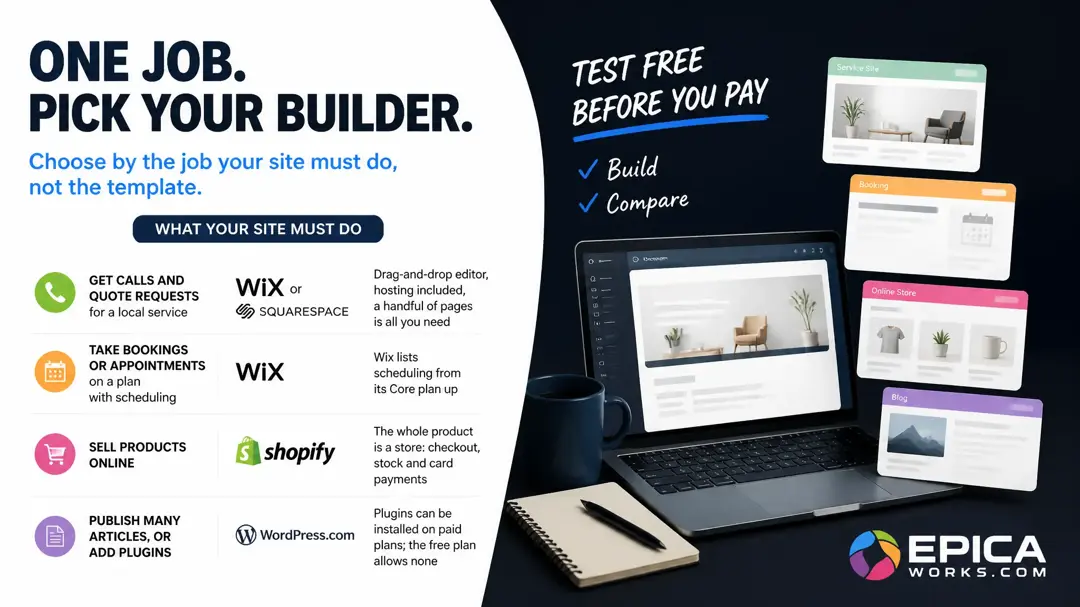
Write down, in one line, what a visitor should do on your site: call you, book a slot, buy a product or read your articles. That line picks the builder, because the job, not the template decides which features you pay for.
| What the site must do | Builder that fits | Why |
|---|---|---|
| Get calls and quote requests for a local service | Wix or Squarespace | Drag-and-drop editor, hosting included, a handful of pages is all you need |
| Take bookings or appointments | Wix, on a plan with scheduling | Wix lists scheduling from its Core plan up |
| Sell products online | Shopify | The whole product is a store: checkout, stock and card payments |
| Publish many articles, or add plugins | WordPress.com on a paid plan | Plugins can be installed on paid plans; the free plan allows none |
Whichever you pick, build one page per service you want calls for, with the service and your town in its title. Put your prices, the jobs you do and the area you cover in the page text, not inside a photo or a PDF menu: Google and ChatGPT read the words on a page, and a price list saved as an image says nothing to either of them.
What each one costs on its entry plan
These are the prices on each builder's own pricing page on November 20, 2026, in US dollars, before tax. The yearly price is billed in one payment.
| Builder | Free way to try it | Entry plan, paid yearly | Same plan, paid monthly |
|---|---|---|---|
| Wix | Free plan with Wix ads | Light, $17 a month | Only yearly prices shown |
| Squarespace | 14-day trial, no free plan | Basic, $19 a month | $25 a month |
| Shopify | 3 days free, then $1 a month for 3 months | Basic, $29 a month | $39 a month |
| WordPress.com | Free plan with WordPress.com ads | Personal, $4 a month | $9 a month |
The entry plan is often not the one you need. On Wix, payments and scheduling start at Core, $29 a month paid yearly.
Squarespace's Basic plan takes a fee on every store sale that its Core plan drops, so if you sell online, price Core rather than Basic. Shopify charges a card rate on each sale on top of the plan.
Budget for the second-year price as well. Wix, Squarespace and WordPress.com each give a free domain for the first year only on yearly plans, and Squarespace says the domain then renews at its standard rate. Write the renewal date in your calendar the day you pay.
Free plans and AI builders, and what they leave out
A free plan is a place to build and test, not to launch a business. Wix's free site lives at an address in the form siteprefix.wixsite.com/siteaddress, shows Wix ads, and connecting your own domain requires a paid plan, according to Wix's help pages. WordPress.com's free plan uses a yoursite.wordpress.com address and, in its own words, “Free sites display WordPress.com ads to visitors.” Every business card and van sign you print with that address has to be reprinted the day you upgrade.
The AI builders are worth trying for a first draft. Wix's builds a site with pages, layout and copy from a description you type in your own words; Squarespace's creates “a multi-page starting point with relevant content, imagery, and styling”. Both let you edit everything afterward in the normal editor.
Treat what they produce as a draft, not a site. The AI writes from the few lines you gave it, so it knows nothing about your prices, your area or the question customers ask first on the phone. Go through every paragraph and replace it with those three things; a home page that could belong to any plumber in the country gives nobody a reason to call you.
Put the domain in your name and check that Google can read the site
The address is the one part you should own outright, whatever builder sits behind it. The SBA explains that you register a domain name through a registrar, renew it on a regular basis, and that nobody else can use it while you own it. Register it with your own email and payment card, even when a builder gives you the first year, so your own account holds it if you change builders or the person who set it up leaves.
Then tell Google the site exists. Open Google Search Console, add your site, and look for the verification setting inside your builder first: Google's help says that on hosting platforms like WordPress, Wix or Squarespace some verification methods may not work, and the platform may offer its own setting or plugin. To check it worked, paste your home page address into the URL Inspection box at the top of Search Console and read whether the page is on Google.
Expect a wait. Google's SEO Starter Guide puts it plainly: “Every change you make will take some time to be reflected on Google's end.” Inspect the page again a week after launch before you change anything.
When a builder is the wrong tool
If your current site already brings calls, moving it costs you evenings and old addresses for little gain; fix the service pages on what you have. A self-hosted WordPress site, installed on your own hosting, is a different product from WordPress.com: the plugins, updates and backups are yours, so skip it unless someone is named to keep it current. If you need custom quoting, a link to your own software or several locations with their own staff, you have outgrown a builder and need a developer.
And if you would rather pay someone than build at all, hiring is its own decision, with its own questions on price and ownership, set out in how to choose marketing help.
This week, open the free plan or trial of the two builders your table row names and build the same page in both: the service you sell most, with your price range and your area written in the text. Keep the builder where that page was finished first, and register your domain in your own name before you pay for its plan.